UI/ UX Design
Mobile + Web
Service Design





A discreet way to speak up during your journey
To design a discreet, anonymous reporting system that lets passengers flag disruptive or unsafe co-passenger behaviour in real time, without the confrontation, delay, or awkwardness that currently stops most people from saying anything at all.
Passengers often encounter disruptive or unsafe behaviours from fellow travellers like loud talking, inappropriate conduct, phones played at high volume, across public and private transport modes (bus, train, metro, flights). Yet there is no safe, quick, or anonymous way to report these disturbances without confrontation.
Who is affected
Solo travellers and women, who are more likely to feel unsafe confronting a stranger directly
Elderly passengers, who may be less comfortable engaging in conflict
Introverted passengers generally, who default to enduring the situation rather than reporting it
Early Concept
A passenger notices disruptive behaviour, scans a QR code (placed visibly in the cabin/coach), and a lightweight complaint window opens, targeting safety issues and disturbances specifically, not general feedback.


Personal Anecdotes
As a student and working professional in Mumbai, I have experienced the public transport on a regular basis which included travelling by city buses(BEST), local train. Apart from that my travel experiences within the country had me travel through buses, trains, flights and metros.
01.
My pain point was that I was not able to make the best use of my travel time (1.5 hrs) everyday to do anything productive like reading or working on presentations.
02.
I have been very intrigued by how the Japanese society takes the "The Culture of Silence" for seriously, how Loud talking and phone calls are forbidden on local trains and buses.
The Approach
To validate if transit misconduct was a systemic problem or a minor annoyance, I conducted qualitative user interviews with 12–15 daily commuters (focusing heavily on solo travelers, women, and regular office goers). The goal was to understand their emotional triggers, coping mechanisms, and why current reporting tools fail them.
"To avoid the disturbance, I plug in my earphones and turn on active noise cancellation whenever I need to focus or destress during my commute."
-Megha, 24, Daily Corporate Commuter
"I often feel unsafe or deeply uncomfortable when people stand too close or stare, but I never confront them because most times I’m traveling alone."
-Prerna, 31, Occasional Commuter
"I see people playing videos on speaker. I want to say something, but it's socially awkward, and there's no way to notify train staff without causing a public argument."
-Rahul, 32, Tech Professional
The Interview "Goldmine" -
Translating Insights to Web-App Decisions
How Insights Dictated the Product Architecture
Insight 1
Fear of Retaliation / Escalation
User Reality: Commuters choose to endure discomfort rather than call out offenders face-to-face.
The solution must be fully anonymous and frictionless
Insight 2
High "Time-to-Task" Resistance
User Reality: In a crowded, moving coach, passengers are dealing with low network bandwidth, high stress, and limited time before their stop. They flatly stated they would never download a 50MB app or wait for an OTP just to report a loud passenger.
Zero-install, lightweight web app accessible via a simple QR code scan
Insight 3
The Need for Contextual Awareness
User Reality: Users can't always look up or read coach numbers when squished in a crowd.
The seat-specific QR code automatically embeds the exact coach number and seat zone data
Stakeholders

Competitive landscape
RailMadad and Moovit address important parts of the passenger experience, but neither focuses on passenger-to-passenger disturbances.
Their solutions are primarily built around operator complaints, transit information and system-level issues.
TransitCare explores this gap through a lightweight, anonymous reporting service that lets passengers discreetly notify the person concerned, creating an alternative to direct confrontation or formal escalation.


Users Base
There are two user groups with opposing needs:
Reporter
“I want to say something without confrontation or revealing myself.”
Concerned passenger
“I need to understand what behaviour is affecting others without feeling attacked.”
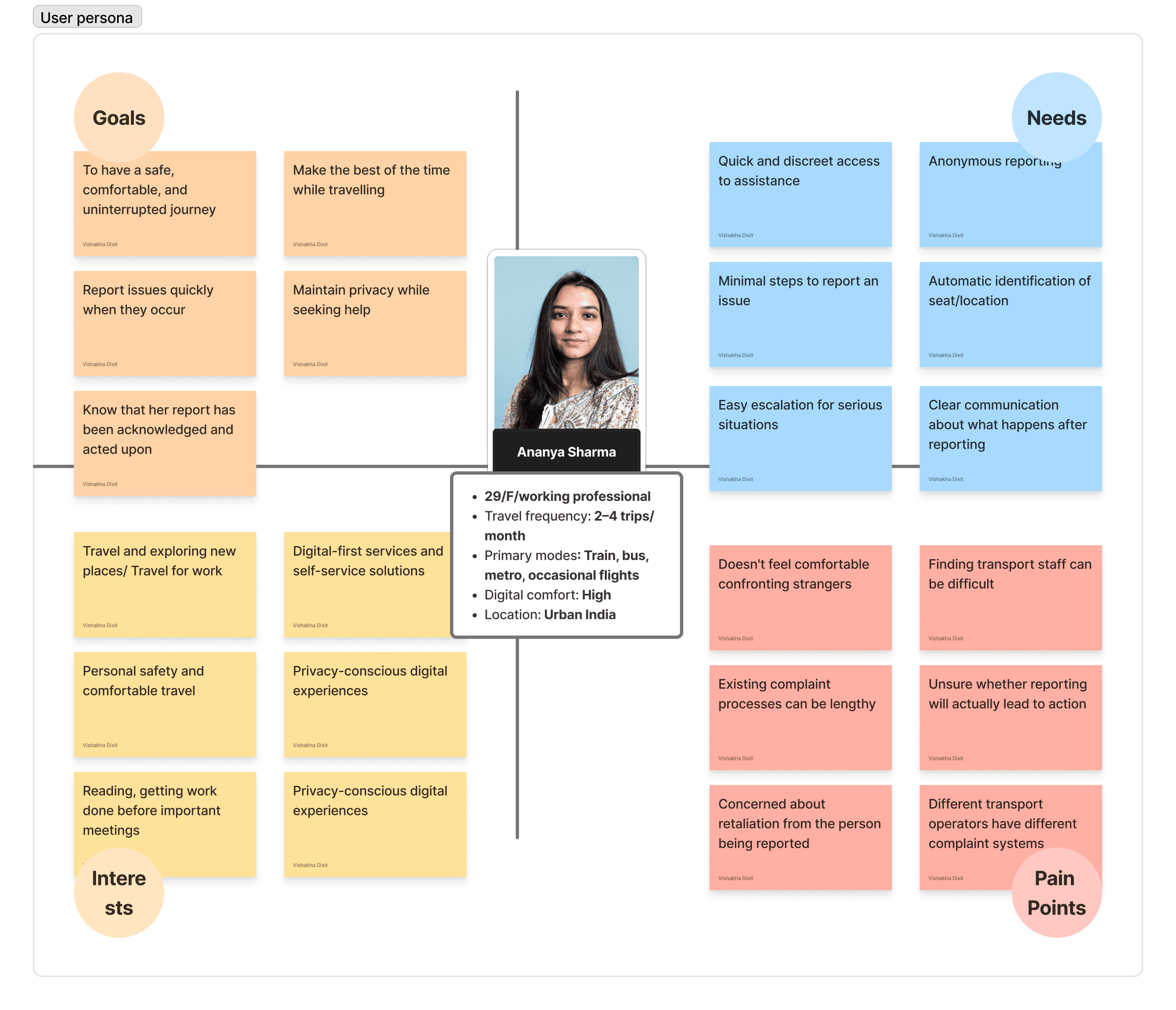
Ananya frequently travels for work and personal trips. She is comfortable using digital services and expects travel experiences to be convenient and predictable. She enjoys reading/ focus on work while travelling.
She generally avoids confrontation with fellow passengers, especially when the situation involves aggressive behaviour, inappropriate conduct, excessive noise, or someone invading her personal space.
Currently, her options are usually to ignore the situation, confront the passenger herself, or find a member of the transport staff - all of which can feel inconvenient or troublesome.
Information Architecture
TransitCare is a quick-action service, not an application users are expected to explore or use regularly. It is accessed when a specific situation occurs during a journey, often when the user may be distracted, uncomfortable, or under time pressure.
Because the service needs to work for a wide range of passengers and age groups, I kept the information architecture intentionally familiar and lightweight. Rather than introducing new interaction patterns or unnecessary layers, the IA follows obvious user behaviours and established navigation conventions, allowing users to understand where they are and what to do without learning the product first.


Report an Issue- Task Flow
Report an issue is the most important user task that. The red highlighted flow was the initial draft which was changed to the green highlighted flow after 7 user testing.
Iterations
01.
The switch of "Issue type" and "seat selection". Since the passenger is more concern about "whats happening" rather than "where is it happening"
02.
Issue type categorised in 3 major titles - Disturbance, Safety, Travel environment. This lets the user take quicker action without having to reading through all the issues.
03.
The passenger is also provided with the freedom to write their grievance by selecting "Other" as an issue option.
04.
Although, TransitCare is a passenger-to-passenger reporting service, if there is a serious safety issue, they can escalate the issue to authorities.
Style Guide


User Interface



Entry Point
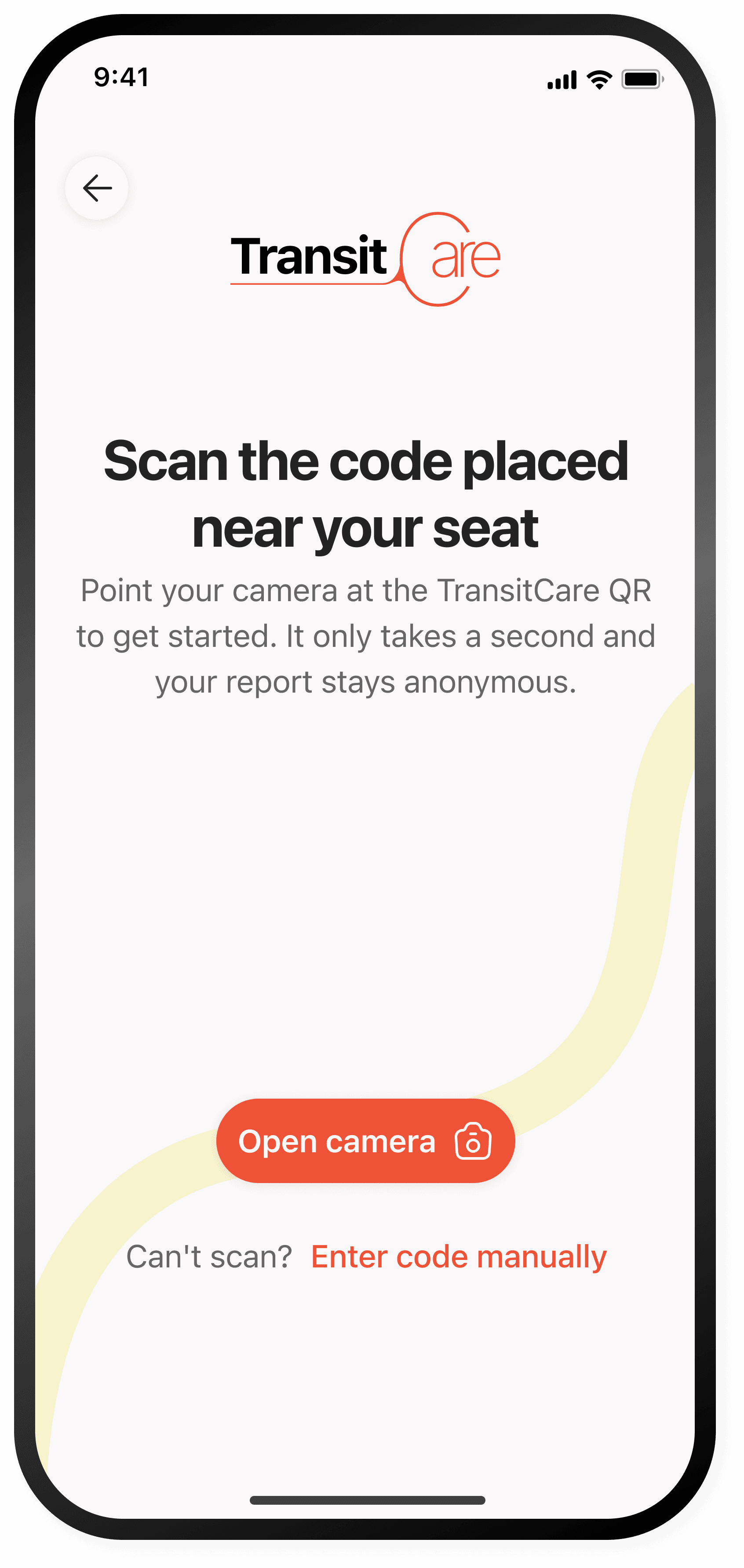
The physical asset mounted on the back of each seat or window panel. It showcases a highly prominent, centralized QR code.
Bypasses traditional app store downloads or sign-up walls. The focus is entirely on speed.
Explicitly states "your report stays anonymous" directly above the fold to reassure anxious or hesitant solo travelers before they take action.
CTA button - "Open Camera", backed by a secondary low-emphasis fallback link for manual entry.


The Alternate Way
This screen serves as a crucial error-recovery path to ensure the service never has a single point of failure.
The input field automatically brings up the keyboard on load.
The large green checkmark provides immediate psychological reassurance.
It tells a potentially stressed passenger that the system is responsive, active and successfully recognized.
Displaying the parsed data allows the user to verify the location before sending an alert, preventing false alarms or sending security to the wrong coach zone.
User freedom to "Change details" in case of incorrect tracking.
Home Screen
By condensing the confirmed journey details into a dark, collapsible header card, the UI frees up maximum vertical screen real estate for the primary task.
The division of issue ensures an anxious user doesn't have to think hard to classify their problem.
The user first thinks "whats happening" then think of "where". The information hierarchy is structured in a way that the user can report easily.


Confirmation & Tracking
After clicking on "Submit", the user gets a confirmation screen with important details and the freedom to track their report.
summary card explicitly reassuring the user that the target passenger (Seat 14B) was notified anonymously.
The copy "Give it a moment to see if things improve" is a deliberate buffer state. It primes the reporter to wait rather than immediately panicking
"Report to authorities CTA in case of serious concern.
Concerned Passenger
A fully automated, structured conversational card delivered via standard SMS/messaging link.
The text deliberately states a fellow passenger "near seat" has flagged a concern rather than revealing the exact seat number

